
Create an Exam
Connect to SuperAnnotate
All qualification exams are hosted on the SuperAnnotate platform. This is the same platform in which all project work is done. To be able to start an exam you first have to configure your SuperAnnotate account.
Click Create My Account
SuperAnnotate Account Setup
After clicking Create My Account:
You will be redirected to SuperAnnotate sign-up page.
- The email field will already be pre-filled.It should match your SME Careers account.
- Enter your First Name
- Enter your Last Name
- Create a Password
- Click Sign up
Verify the connection
After the account is configured, return to the Exams tab in the SME Careers dashboard and click Verify Your Account. This step checks that your account is correctly configured and links it with your SME Careers account.
Starting an Exam
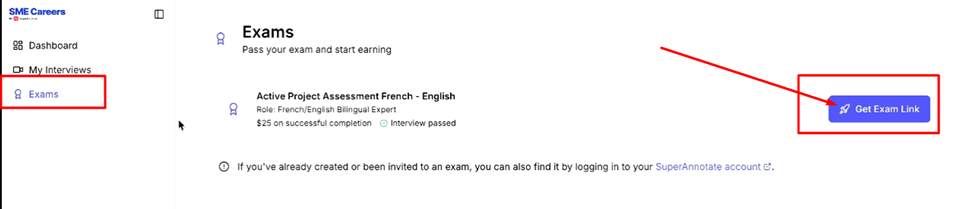
After verifying your account, you will see a list of the exams that you are required to complete. To start an exam press Get Exam Link. Once the link is generated you can either click Open Exam or copy and paste the link into another browser tab.
Once you click Open Exam, the assessment will open inside SuperAnnotate Platform. You will see three main sections on the left:
- Instructions
- Questions
- Video (optional)
Updated about 2 months ago